附件包含:
Modbus Poll 7.2.5 (64位) 官方下载链接
Modbus Slave 8.2.3 (64位) 官方下载链接
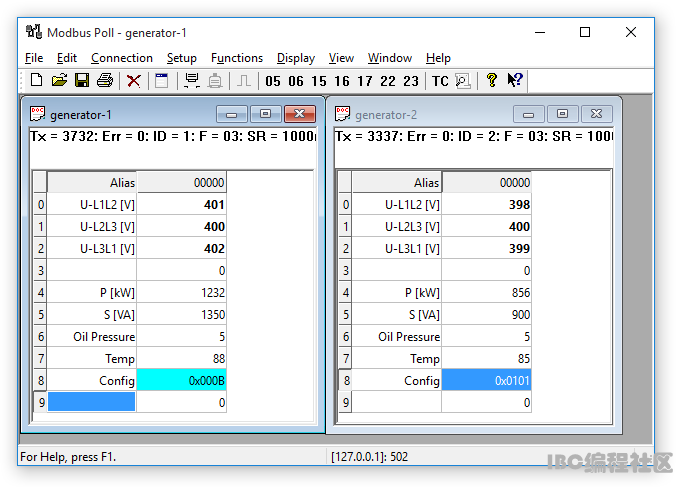
OverviewModbus Poll uses a multiple windows user interface. That means you can open several windows showing different data areas or data from different slave ID's at the same time. You can write any text in the Alias cells. In any dialog box you can press the F1 key for more help on that specific topic.
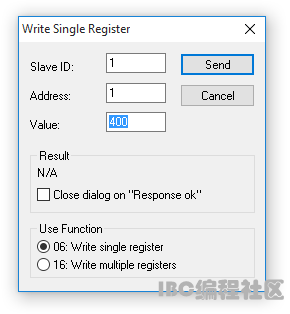
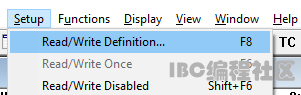
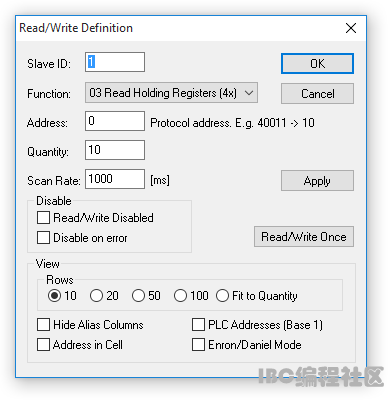
If your slave device allows you to change a Holding register then you double click the cell or just start typing a new value in the cell. Then an edit dialog box is shown. Change the read/write definitionTo change the read/write definition of a window you can press F8 or select "read/write definition" from the Setup menu.
Here you define which data to show in the window. This setup shows how to read 10 Holding Registers from address 0. Address 40001 in some protocol descriptions. Note that Modbus Poll uses Modbus addresses which always counts from 0.
Device and MODBUS address rangesDevice addressMODBUS addressDescriptionFunctionR/W
1...10000* address - 1 Coils (outputs) 01 Read/Write
10001...20000* address - 10001 Discrete Inputs 02 Read
40001...50000* address - 40001 Holding Registers 03 Read/Write
30001...40000* address - 30001 Input Registers 04 Read
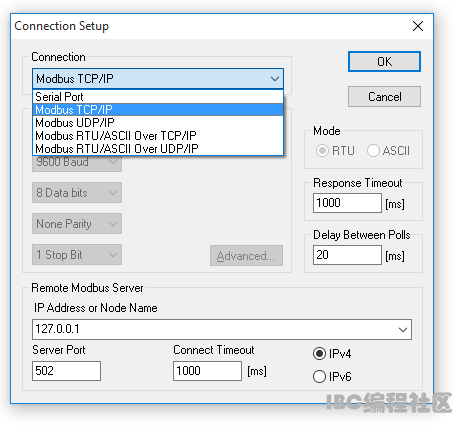
How to make a connectionThere is no data to display if you have not made a connection. To do so press F3 or select connect from the connection menu. For more detailed help press F1.
This connection use Modbus TCP/IP. 5 different connection types are available however only 2 of them are standard Modbus connections: For serial connection you may need an USB to RS485, or an RS232 to RS485 converter.
| 


 提升卡
提升卡 置顶卡
置顶卡 沉默卡
沉默卡 喧嚣卡
喧嚣卡 变色卡
变色卡 千斤顶
千斤顶 显身卡
显身卡